Understanding MCP (Model Context Protocol): A Standard Protocol Connecting AI to External Systems
Lately, there’s been a lot of talk about MCP (Model Context Protocol) in the AI field. In a previous post, I shared my experience building and using my own MCP server.
However, while using MCP, I had questions like “What exactly is MCP’s structure?” and “How does the LLM communicate with the MCP server?”
In this post, I’d like to explore MCP’s internal structure and how it works. Think of it as reading through the MCP spec documentation together.
What is MCP?
MCP (Model Context Protocol) is an Open Standard that Anthropic released in November 2024. In short, it can be defined as a standardized protocol for connecting AI applications to external systems.
But why did such a protocol become necessary?
The Problem MCP Solves
AI models only know up to their training data. So to get the latest information, access external databases, or execute specific tools, integration with external systems is essential.
The problem was that these integration methods were fragmented until now.
  flowchart TB
    subgraph Before["Before MCP: Fragmented Integration"]
        LLM1["LLM Application"]
        LLM1 -->|"Custom API A"| DB1["Database"]
        LLM1 -->|"Custom API B"| GitHub1["GitHub"]
        LLM1 -->|"Custom API C"| Slack1["Slack"]
        LLM1 -->|"Custom API D"| Drive1["Google Drive"]
    end
Each data source required different integration methods. GitHub had its way, Slack had its way, databases had another way. Every time a new data source was added, integration logic had to be built from scratch.
It’s similar to before JSON emerged, when each service used different data formats (XML, CSV, etc.). A separate parser had to be created whenever a new service was added. (Though some still use XML today…)
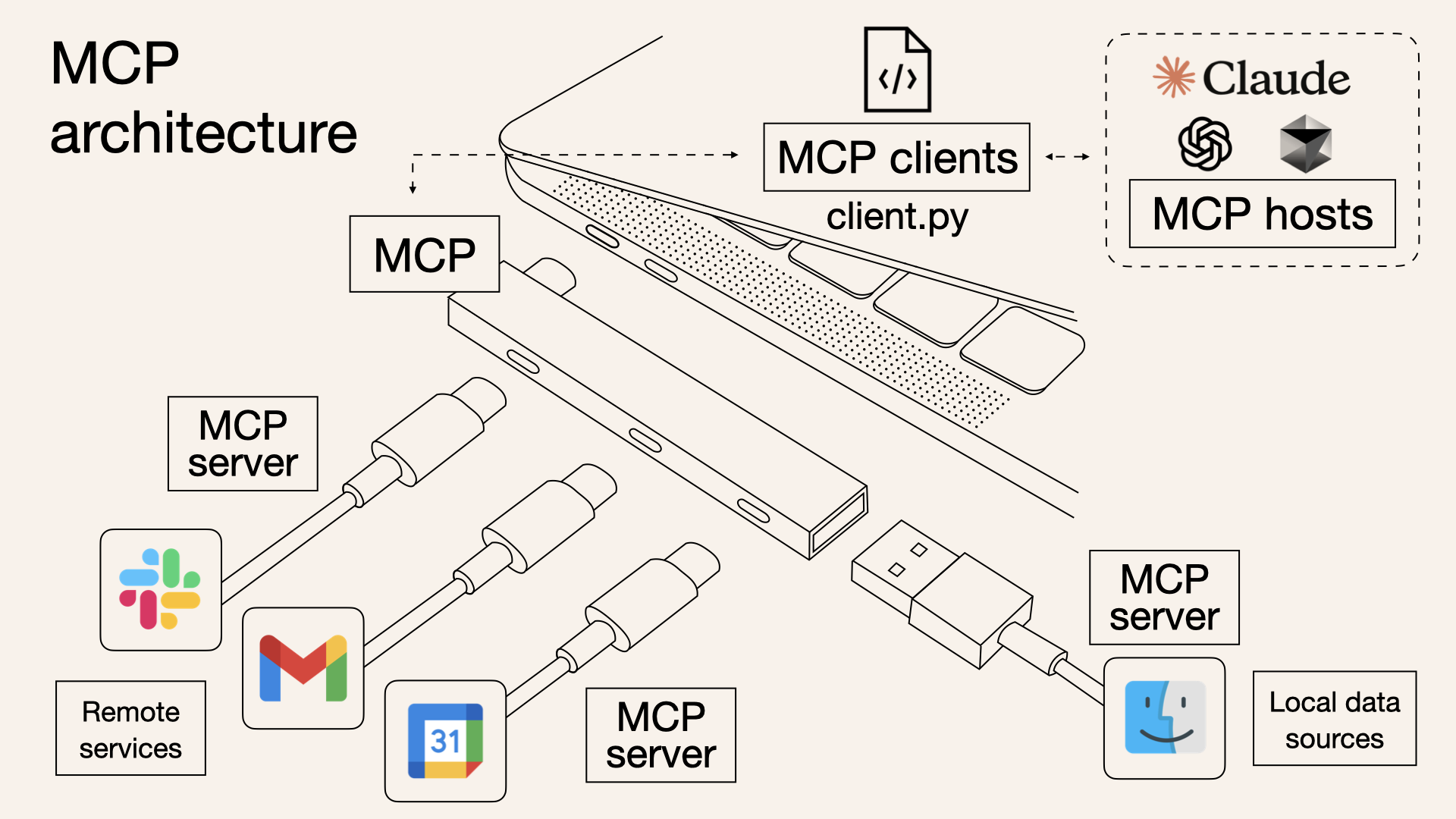
Anthropic explains this problem using the USB-C analogy. Before, every phone had different charging ports. Samsung used micro USB, Apple used Lightning, and other manufacturers used other standards. Then USB-C came along as a standard, allowing one cable to connect all devices.
  flowchart TB
    subgraph After["After MCP: Standardized Integration"]
        LLM2["LLM Application"]
        LLM2 -->|"MCP"| Server1["DB MCP Server"]
        LLM2 -->|"MCP"| Server2["GitHub MCP Server"]
        LLM2 -->|"MCP"| Server3["Slack MCP Server"]
        LLM2 -->|"MCP"| Server4["Drive MCP Server"]
    end
MCP plays that USB-C role. It enables connections to various external systems with a single protocol.
MCP’s Birth and Adoption
MCP was released as open source by Anthropic on November 25, 2024. What’s interesting is how quickly it’s becoming an industry standard.
- November 2024: Anthropic releases MCP, provides Python/TypeScript SDKs
- March 2025: OpenAI CEO Sam Altman announces MCP support - “People love MCP and we are excited to add support across our products”
- April 2025: Google DeepMind CEO Demis Hassabis hints at MCP support for Gemini - “MCP is a good protocol and it’s rapidly becoming an open standard”
- December 2025: MCP donated to Agentic AI Foundation (AAIF) under Linux Foundation - Co-founded by Anthropic, Block, and OpenAI
I found it impressive that although Anthropic created it, OpenAI and Google have also adopted it. It’s becoming a standard recognized even by competitors. This seems to show that MCP aims to solve common challenges for the entire industry, not just one company’s technology.
So what exactly is MCP’s structure?
MCP Architecture: Host, Client, Server
To understand MCP’s architecture, you need to know three key concepts: Host, Client, and Server.
  flowchart TB
    subgraph Host["MCP Host (AI Application)"]
        direction TB
        App["Claude Desktop / VS Code etc."]
        Client1["MCP Client 1"]
        Client2["MCP Client 2"]
        Client3["MCP Client N"]
    end

    Server1["MCP Server 1<br/>(GitHub)"]
    Server2["MCP Server 2<br/>(Database)"]
    Server3["MCP Server N<br/>(Slack)"]

    Client1 <-->|"MCP Protocol"| Server1
    Client2 <-->|"MCP Protocol"| Server2
    Client3 <-->|"MCP Protocol"| Server3
Host
The Host is the AI application using MCP. This includes Claude Desktop, Claude Code, VS Code’s AI extensions, etc.
The Host’s role is to manage multiple MCP clients and orchestrate interactions between users and the AI model.
Client
The Client is the role responsible for MCP protocol communication between Host and Server. It’s usually implemented inside the Host, but conceptually it should be understood as a logical role handling protocol communication. Each Client maintains a 1:1 connection with a single Server.
For example, if Claude Desktop uses three MCP servers—GitHub, Slack, and Database—internally there are three MCP Clients, each connected to their respective servers.
Server
The Server is the component that provides access to external systems. It exposes various external resources like databases, APIs, and file systems for the LLM to use.
Let’s look more specifically at how these three components interact.
The Core of Architecture: Separation of Concerns
The advantage of this structure is that concerns are clearly separated.
| Component | Responsibility |
|---|---|
| Host | User interface, AI model management, permission control |
| Client | Protocol communication, connection management, message routing |
| Server | External system integration, data/function provision |
The Server doesn’t need to know what AI model the Host is using—it just provides data according to the MCP protocol. Conversely, the Host doesn’t need to know how the Server internally calls the GitHub API.
Thanks to this separation, once you create one Server, it can be used from any Host—Claude, ChatGPT, Gemini, etc. It’s a platform-independent structure.
Sound familiar? Depend on interfaces, not implementations—the basic principle of object-oriented design applies here too. Thanks to the standard interface called MCP, Host and Server can collaborate without knowing each other’s implementations.
MCP Protocol: JSON-RPC-Based Communication
So how exactly do Client and Server communicate? Let’s first look at what data they exchange.
MCP is based on JSON-RPC 2.0.
What is JSON-RPC?
JSON-RPC is a simple, lightweight protocol that enables Remote Procedure Calls (RPC) using JSON (JavaScript Object Notation) data format.
Compared to REST APIs we’re familiar with, here’s the difference:
| |
REST is resource-centric (nouns), while JSON-RPC is action-centric (verbs). In MCP, actions like “list tools,” “execute tool,” “read resource” are central, which is why JSON-RPC seems to be a better fit.
Also, JSON-RPC naturally supports bidirectional communication. Clients can request from servers, and servers can send notifications to clients. This characteristic is utilized for MCP’s real-time notification features.
Message Types
There are three main message types exchanged in MCP.
1. Request
A message that requires a response. It has an id field to identify which request the response is for.
| |
2. Response
A response to a request. It has the same id and includes either result or error.
| |
3. Notification
A one-way message that doesn’t require a response. It has no id field.
| |
All MCP communication happens through these three message types. I think it’s a simple yet powerful structure.
Connection Establishment: Initialization Process
Before Client and Server can communicate, they must go through an Initialization process.
  sequenceDiagram
    participant Client as MCP Client
    participant Server as MCP Server

    Client->>Server: Initialize Request<br/>(protocol version, client info, capabilities)
    Server-->>Client: Initialize Response<br/>(protocol version, server info, capabilities)
    Client->>Server: Initialized Notification<br/>(initialization complete notice)

    Note over Client,Server: Normal communication now possible
Initialize Request
The client first informs the server of its information and supported capabilities.
| |
protocolVersion is the MCP version the client uses. capabilities lists the features the client supports. For example, having sampling means the client provides LLM calling functionality.
Initialize Response
The server also responds with its information and provided capabilities.
| |
Looking at the server’s capabilities, we can see this server provides tools, resources, and prompts. listChanged: true means it will send notifications when the tool list changes.
Capability Negotiation
What’s important in this initialization process is capability negotiation. Client and server exchange their supported features, and only features supported by both sides are used.
For example:
- If the client said it supports
sampling, the server can request this feature - Since the server said it provides
tools, the client can request the tool list
Thanks to this approach, backward compatibility can be maintained while adding new features. Even if an old client communicates with a new server, they just use features both commonly support.
MCP’s Core Features: Tools, Resources, Prompts
Features provided by MCP servers can be broadly divided into three categories: Tools, Resources, and Prompts.
  flowchart LR
    subgraph Server["What MCP Server Provides"]
        Tools["Tools<br/>(Executable functions)"]
        Resources["Resources<br/>(Read-only data)"]
        Prompts["Prompts<br/>(Message templates)"]
    end

    LLM["LLM"] -->|"Execute"| Tools
    LLM -->|"Read"| Resources
    User["User"] -->|"Select"| Prompts
Let’s look at what role each plays.
Tools: Functions the LLM Executes
Tools are functions that the LLM can directly call. They can perform various tasks like database queries, API calls, and calculations.
Tool Discovery
First, the client queries what tools the server provides.
| |
Looking at the response, each tool includes its name, description, and input schema. The inputSchema is in JSON Schema format, defining what parameters are needed to call this tool.
Based on this information, the LLM decides on its own which tool to use and when. If a user says “Tell me Seoul’s weather,” the LLM selects the get_weather tool and calls it with location: "Seoul" as the parameter.
Tool Execution
Executing a tool is also straightforward.
| |
Results are returned as a content array. Not just text, but various forms of results like images and audio can be returned.
The Meaning of Model-Controlled
The most important characteristic of Tools is that they’re Model-Controlled. It’s not a person explicitly instructing “use this tool,” but the LLM inferring the situation and selecting and calling tools on its own.
Of course, for this to work, the LLM needs to understand the tools well. That’s why writing a clear description is important. “Gets weather” is less useful than “Retrieves current weather information (temperature, conditions) for a specified city”—the more specific, the higher the inference accuracy.
How Does the LLM Know About and Call MCP Tools?
Here’s an important misconception I should address. MCP itself doesn’t perform inference. MCP is just a protocol for exchanging data, and judgment and selection are entirely handled by the Host’s LLM.
So how does the LLM “automatically” select and call MCP tools? Let’s look at the complete flow.
  sequenceDiagram
    participant User as User
    participant Host as Host (Claude Desktop, etc.)
    participant MCP as MCP Server
    participant LLM as LLM API (Claude)

    Note over Host,MCP: Step 1: Initialization - Collecting tool info
    Host->>MCP: tools/list request
    MCP-->>Host: Return tool list (names, descriptions, parameters)

    Note over User,LLM: Step 2: Pass user request + tool info to LLM
    User->>Host: "Tell me Seoul's weather"
    Host->>LLM: User message + tool definitions via tools parameter

    Note over LLM: Step 3: LLM's inference (Tool Use)
    LLM->>LLM: "Weather question? get_weather tool would be appropriate"

    Note over Host,MCP: Step 4: Host performs actual MCP call
    LLM-->>Host: Return tool_use block (tool name, parameters)
    Host->>MCP: Execute tools/call
    MCP-->>Host: Return result

    Note over User,LLM: Step 5: Pass result to LLM for final response
    Host->>LLM: Pass result as tool_result
    LLM-->>Host: Generate natural language response
    Host-->>User: "The current weather in Seoul is 15°C..."
Here’s the flow explained:
Host collects tool information: The Host (e.g., Claude Desktop) calls
tools/liston the MCP Server to get the list of available tools. This information includes tool names, descriptions, and required parameters.Host passes tool definitions to LLM API: When the user sends a message, the Host includes the collected tool definitions in the
toolsparameter when calling the LLM API. Using Claude API as an example:
| |
LLM judges on its own: The LLM has learned the ability called Tool Use (or Function Calling). Looking at the user’s question and the given tool list, it infers “which tool should be called with what parameters in this situation.”
LLM requests tool call in structured form: If it decides to use a tool, the LLM returns a structured response like this:
| |
- Host performs actual MCP call: The LLM doesn’t call the MCP Server directly. The Host receives this
tool_useresponse, actually sends atools/callrequest to the MCP Server, and passes the result back to the LLM.
To summarize, MCP is a standardized pipeline for providing tools, and tool selection is 100% the LLM’s inference ability. The Host serves as the orchestrator connecting these two.
This is exactly why the description mentioned earlier is important. The LLM can’t see the tool’s actual implementation code—it judges only by name and description. Good descriptions help the LLM select the right tool in the right situation.
Sound familiar? It’s abstraction. When we program, we can use functions by just looking at the function name and description without knowing the internal implementation. MCP tools are the same. The LLM can’t see the function’s internal code and judges only by metadata (name, description, input schema).
Resources: Read-Only Data
Resources are read-only data provided by the server. File contents, database schemas, configuration information fall under this category.
| |
Each resource is identified by a URI. Various schemes like file://, https://, git:// can be used.
Tools vs Resources: What’s the Difference?
At first, you might wonder “Can’t I just use Tools to read data from a database?” Yes, you can. So why do Resources exist separately?
| Tools | Resources | |
|---|---|---|
| Purpose | Perform actions (side effects possible) | Read data (read-only) |
| Control | LLM auto-selects | Application/user selects |
| Modification | Can modify data | Cannot modify, read only |
Tools are called by the LLM’s own judgment, but Resources are usually explicitly selected by the application or user. Like “add this file to context” in an IDE.
Also, Resources support Subscription functionality. You can receive notifications when specific resources change. Useful for automatically updating context when a file is modified.
Prompts: Reusable Templates
Prompts are message templates that users can select. You can pre-define frequently used prompt patterns and reuse them.
| |
Unlike Tools or Resources, Prompts are User-Controlled. The LLM doesn’t select them automatically—users explicitly select them from the UI. They’re usually exposed as / commands (slash commands).
Interaction of the Three Features
In actual usage scenarios, these three features work together.
  sequenceDiagram
    participant User as User
    participant Host as MCP Host
    participant Server as MCP Server

    User->>Host: "/code_review execute"
    Host->>Server: prompts/get (code_review)
    Server-->>Host: Prompt template

    Host->>Host: Pass to LLM

    Note over Host: LLM determines<br/>tools are needed for code analysis

    Host->>Server: tools/call (analyze_code)
    Server-->>Host: Analysis results

    Host->>Server: resources/read (style_guide)
    Server-->>Host: Coding style guide

    Host-->>User: Comprehensive code review results
- User selects
code_reviewprompt - LLM calls code analysis tool
- References style guide resource
- Synthesizes all information to generate code review results
This is how the three features organically connect to create rich AI experiences.
Implementing with FastMCP
We’ve looked at the concepts of Tools, Resources, and Prompts. Aren’t you curious how to actually implement them? Using FastMCP, you can easily create MCP servers with Python decorators.
FastMCP is a Pythonic framework for MCP server implementation. It abstracts away complex protocol handling so you can focus on business logic.
| |
Looking at the code, you can see that each decorator corresponds exactly to the concepts explained earlier.
| Decorator | MCP Concept | Control Method | Purpose |
|---|---|---|---|
@mcp.tool() | Tools | Model-Controlled | Functions LLM decides to call |
@mcp.resource() | Resources | App/User-Controlled | Read-only context data |
@mcp.prompt() | Prompts | User-Controlled | Reusable message templates |
Notably, the docstring directly becomes the description. Since the LLM selects tools based on this description, I think it’s important to write clear docstrings.
Function type hints (city: str) are automatically converted to inputSchema. FastMCP leverages Python’s type system to generate JSON Schema.
To use this server with Claude Desktop, add it to the configuration file:
| |
Besides FastMCP, you can create MCP servers in TypeScript, Java, Kotlin, C#, Rust, and more. The official documentation’s Build an MCP Server guide explains implementation methods for each language in detail.
⚠️ Important note for stdio-based server development: Stdout output like
print()(Python) orconsole.log()(JavaScript) can corrupt JSON-RPC messages and break the server. Make sure logging is configured to output to stderr or files.
Transport Layer: stdio and Streamable HTTP
So far we’ve looked at what is exchanged; now it’s time to see how it’s exchanged. MCP defines two standard transport methods.
stdio: Local Process Communication
The simplest method. The Host runs the MCP server as a subprocess and communicates via standard input/output (stdin/stdout).
  flowchart LR
    subgraph Host["MCP Host"]
        Client["MCP Client"]
    end

    subgraph Server["MCP Server Process"]
        ServerApp["Server Logic"]
    end

    Client -->|"stdin"| ServerApp
    ServerApp -->|"stdout"| Client
Characteristics:
- No network overhead (runs on the same machine)
- Simple setup (just specify server program path)
- No security setup needed (local communication)
This method is used when Claude Desktop or Claude Code uses local MCP servers.
| |
Messages are separated by newlines (\n). One JSON-RPC message per line.
Streamable HTTP: Remote Server Communication
When communicating with remote servers, HTTP is used. The client sends messages via HTTP POST, and the server returns responses as Server-Sent Events (SSE) streams.
  sequenceDiagram
    participant Client as MCP Client
    participant Server as Remote MCP Server

    Client->>Server: POST /mcp<br/>(JSON-RPC message)
    Server-->>Client: SSE Stream starts
    Server-->>Client: Event: JSON-RPC response
    Server-->>Client: Event: Additional notifications (if any)
    Server-->>Client: Stream ends
Why use SSE?
Simple HTTP request/response could work for communication. But in MCP, there are cases where the server needs to send messages to the client first:
- Notifying when tool list changes
- Progress updates for long operations
Using SSE, the server can stream multiple messages to the client.
Session Management
In Streamable HTTP, there’s a session concept. The server issues a session ID during initialization, and this ID is included in all subsequent requests.
// Initialization response header
Mcp-Session-Id: abc123xyz

// Subsequent request header
Mcp-Session-Id: abc123xyz
When the session expires, the server returns HTTP 404, and the client must start a new initialization.
Security Considerations
When using Streamable HTTP, security must be considered.
- Origin header validation: Prevent DNS rebinding attacks
- Implement authentication: Bearer Token, API Key, OAuth, etc.
- localhost binding: When running locally, bind only to 127.0.0.1
Authentication is essential, especially if the MCP server can access sensitive data (databases, file systems, etc.).
Which Transport Method Should You Choose?
| stdio | Streamable HTTP | |
|---|---|---|
| Use Case | Local tools, personal development | Shared services, team tools |
| Pros | Simple setup, fast | Remote access, centralized management |
| Cons | Local only | Network overhead, security setup required |
For personal MCP servers, I think stdio is sufficient. If you need to share with a team or access from multiple environments, consider Streamable HTTP.
Sampling: How Servers Call the LLM
So far, we’ve looked at Host (client) → Server communication. But in MCP, the reverse direction is also possible. The Server can request the Host to make an LLM call.
This feature is called Sampling.
  sequenceDiagram
    participant Server as MCP Server
    participant Client as MCP Client
    participant LLM as LLM Provider

    Note over Server: Server logic running<br/>Needs LLM help

    Server->>Client: sampling/createMessage

    Note over Client: Request approval<br/>from user (optional)

    Client->>LLM: LLM API call
    LLM-->>Client: Response
    Client-->>Server: Return result
Why is This Feature Needed?
When building MCP servers, there are cases where LLM help is needed inside the server.
For example:
- When you want to summarize and return search results
- When complex data needs to be explained in natural language
- When running AI agent logic on the server side
Using Sampling, the server doesn’t need its own LLM API key. Instead of the server directly executing the model, it requests model execution from the Host and receives the result.
Sampling Request Example
| |
You can give hints about the desired model in modelPreferences, but the final model selection is made by the client. The server can only give hints like “a faster model would be better.”
The Importance of Human Oversight
The MCP spec emphasizes Human-in-the-loop regarding Sampling.
“Implementations must always include human oversight capabilities for sampling requests.”
Clients must be able to show Sampling requests to users and get approval. This is to prevent MCP servers from maliciously abusing the LLM.
In fact, Claude Desktop shows a UI asking for user confirmation when MCP servers call tools or request Sampling.
Real-Time Updates: Notification System
Another interesting feature in MCP is Notifications. Servers can inform clients of changes in real-time.
| |
Upon receiving this notification, the client calls tools/list again to get the latest tool list.
What Notifications Are There?
| Notification | Description |
|---|---|
notifications/tools/list_changed | Tool list changed |
notifications/resources/list_changed | Resource list changed |
notifications/resources/updated | Specific resource content changed |
notifications/prompts/list_changed | Prompt list changed |
Thanks to this feature, you can create dynamic MCP servers. Update the tool list when a new plugin is installed, update resources when config files change, or send notifications when database schema changes.
If you don’t need real-time notifications, you don’t have to implement this feature. Clients only expect notifications when the server declares listChanged: true in capabilities.
MCP Usage in Real-World Services
The examples we’ve looked at so far have mostly been based on local environments. Running local MCP servers from Claude Desktop, communicating via stdio. But what about building actual production services?
MCP Beyond Local Environments
Let’s assume an e-commerce company is building an AI chatbot. The chatbot needs to provide features like order lookup, product search, and inventory checking.
Method 1: Custom REST API Approach
The approach of implementing directly without MCP. Many of you have probably built AI chatbot backends this way.
  flowchart TB
    subgraph Client["User Browser"]
        UI["Chat UI"]
    end

    subgraph Backend["AI Chatbot Backend Server"]
        API["API Server"]
        Router["Request Analysis Logic"]
    end

    subgraph Services["Internal Services"]
        Order["Order Service"]
        Product["Product Service"]
        DocSearch["Document Search Service"]
    end

    subgraph External["External"]
        LLM["LLM API or LLM Model"]
    end

    UI -->|"Question"| API
    API --> Router
    Router -->|"REST"| Order
    Router -->|"REST"| Product
    Router -->|"REST"| DocSearch
    API <-->|"Prompt"| LLM
In this approach, the backend analyzes user questions to decide which service to call, calls different REST API interfaces for each service, and backend routing logic needs modification whenever a new service is added.
It works like this. But as services grow, several problems can arise.
- Interface inconsistency: Order service uses
/orders/{id}, product service uses/api/products/search… Each service has different API designs - Documentation burden: Separate management of API docs for each service
- LLM integration complexity: Manually writing explanations in prompts for LLM to understand each service
- Maintenance cost: When service APIs change, both backend router and LLM prompts need modification
Method 2: MCP Standardization Approach
Now let’s look at a structure with MCP.
  flowchart TB
    subgraph Client["User Browser"]
        UI["Chat UI"]
    end

    subgraph Backend["AI Chatbot Backend Server (MCP Host)"]
        API["API Server"]
        MCPClient["MCP Client"]
    end

    subgraph MCPServers["MCP Servers (HTTP)"]
        OrderMCP["Order MCP Server"]
        ProductMCP["Product MCP Server"]
        DocMCP["Document Search MCP Server"]
    end

    subgraph External["External"]
        LLM["LLM API or LLM Model"]
    end

    UI -->|"Question"| API
    API --> MCPClient
    MCPClient <-->|"MCP (HTTP)"| OrderMCP
    MCPClient <-->|"MCP (HTTP)"| ProductMCP
    MCPClient <-->|"MCP (HTTP)"| DocMCP
    API <-->|"tools parameter"| LLM
Here are the key differences between the two methods:
- Backend serves as MCP Host: Receives user requests and orchestrates LLM API and MCP servers
- MCP servers deployed as separate services: Containers, microservices, serverless, etc.
- Communication via Streamable HTTP: HTTP-based communication, not local stdio
- Automatic tool info collection: Backend collects tool lists from each MCP server via
tools/listat startup
Service Structure Example
Let’s see how it’s structured in actual code.
MCP Server: Order Lookup Service
| |
Backend Server: MCP Host Role
| |
Benefits of MCP Standardization
What benefits does adopting MCP bring?
1. Consistent Interface
All services follow the same MCP protocol. Query tool lists with tools/list, call with tools/call. No need to worry about different REST API designs for each service.
2. Self-describing
Each MCP server describes its functionality through description and inputSchema. No need to write in prompts “the order service has these features…” Just pass the tool info directly when calling the LLM API.
3. Independent Deployment
Each MCP server can be deployed and updated independently. Even when adding new features to the order service, the backend automatically recognizes new tools by calling tools/list again.
4. Ecosystem Compatibility
MCP is an open standard. An MCP server created in-house can be used from Claude Desktop as-is, and from other MCP-compatible clients too.
5. Separation of Concerns
- MCP Server: Focus on business logic (order lookup, cancellation, etc.)
- Backend: Focus on orchestration (user auth, MCP connections, LLM calls)
- LLM: Focus on inference (understanding user intent, tool selection)
What Specifically Changes?
Honestly, just looking at the benefits above, you might think “so what?” Let’s compare with a specific scenario.
Scenario: Adding “Refund Lookup” Feature
| Step | REST Approach | MCP Approach |
|---|---|---|
| 1 | Develop refund API | Develop refund MCP tool |
| 2 | Write API docs (Swagger, etc.) | (Tool definition is the doc) |
| 3 | Add new route to backend router | (Not needed) |
| 4 | Add tool description to LLM prompt | (tools/list auto-collects) |
| Modification Points | 4 places | 1 place |
See the difference? In MCP, one tool definition is the doc, the interface, and the LLM prompt. This is the Single Source of Truth.
With 3 tools, it might not seem different, but with 30 tools, it’s a different story. In REST approach, you manage 30 × 4 = 120 places, but with MCP, just 30 places.
Connection to Software Design Principles
While writing this post, I noticed that MCP’s design philosophy aligns with good software design principles we know.
- Abstraction: LLM doesn’t know implementation, only sees interface (name, description, schema)
- Single Responsibility Principle (SRP): Each MCP server handles only one domain
- Open-Closed Principle (OCP): Extend without modifying existing code when adding new tools
- Dependency Inversion (DIP): Depend on protocol (interface), not implementation
In the end, the problem MCP is solving doesn’t seem new. “A system flexible to change and easy to maintain”—it’s applying the goal we’ve always pursued to the AI tool integration domain.
Deployment Architecture Example
I’ve drawn an MCP server configuration diagram using MCP. It’s probably easier to understand as architecture.
  flowchart TB
    subgraph K8s["Kubernetes Cluster"]
        subgraph Backend["Backend Pods"]
            API1["API Pod 1"]
            API2["API Pod 2"]
        end

        subgraph MCP["MCP Server Pods"]
            Order["order-mcp"]
            Product["product-mcp"]
            Docs["docs-mcp"]
        end

        Ingress["Ingress"]
    end

    subgraph External["External"]
        User["User"]
        LLM["Claude API"]
    end

    User --> Ingress
    Ingress --> API1
    Ingress --> API2
    API1 & API2 <--> Order & Product & Docs
    API1 & API2 <--> LLM
- Deployed as Kubernetes Pods
- Exposed as internal services (no direct external access)
- Communication via Streamable HTTP
- Each can scale independently
When Should You Adopt MCP?
Of course, I don’t think MCP is needed for every service.
When MCP is Useful
- When multiple AI features (chatbot, search, recommendations, etc.) use the same backend services
- When new features are frequently added and LLM needs to recognize them automatically
- When you want to standardize and share AI tools across teams
- When you want to use the same server code for local development (stdio) and production (HTTP)
When MCP Might Be Overkill
- Single AI feature with only 1-2 tools
- When you need to quickly build an MVP (direct REST API calls are simpler)
- When the team can’t afford the learning cost of MCP
The key is whether the benefits of standardization offset the adoption cost. MCP’s value grows as services grow and AI features increase, but there’s no need to over-design from the start.
However, what we’ve discussed so far is about adopting MCP in our services to provide to users. But currently, in most cases, individuals install and run MCP servers locally. So the design considerations are different from simply running MCP servers locally.
MCP’s Limitations and Security Considerations
So far we’ve looked at MCP’s structure and features. But like all technology, MCP isn’t perfect either.
Security Vulnerabilities
In 2025, several security researchers published MCP-related security issues.
Major Vulnerabilities:
- Prompt Injection: According to Simon Willison’s analysis, if data returned by MCP servers contains malicious instructions, it can manipulate LLM behavior. OWASP also ranked Prompt Injection as the #1 LLM security risk.
- Tool Poisoning: Palo Alto Unit42 research published an attack vector where malicious instructions hidden in tool metadata (description) can make LLMs call unintended tools. The problem is malicious instructions invisible to users but interpretable by AI models.
- Critical RCE Vulnerability: CVE-2025-6514 discovered by JFrog Security Research (CVSS 9.6) is a remote code execution vulnerability found in mcp-remote package (v0.0.5~0.1.15). Connecting to a malicious MCP server could execute arbitrary commands on the client OS, and the package was downloaded over 437,000 times.
Exposed MCP Servers:
Trend Micro research found 492 MCP servers exposed to the internet operating without authentication or encryption. These servers had access to 1,402 tools total, with over 90% providing direct read access to data sources. Bitsight report also warned that about 1,000 MCP servers were exposed to the public internet without authentication.
Also, according to Astrix’s MCP Security Status Report, 88% of MCP servers require credentials, but 53% of those rely on long-lived static API keys or PATs (Personal Access Tokens).
Seeing these research results, I realized that security requires special attention when using MCP.
Recommended Security Practices
Server Side
- Validate all input values
- Implement proper access control
- Apply rate limiting
- Filter sensitive data
Client Side
- Request user confirmation for sensitive operations
- Display input values before tool calls
- Log tool executions
- Set timeouts
I think applying the principle of least privilege is especially important if the MCP server accesses file systems or databases.
Summary
In this post, we explored MCP’s structure and how it works. To summarize:
MCP is a standard protocol connecting AI to external systems. Like USB-C, one standard enables various connections.
Host-Client-Server architecture separates concerns. Thanks to this, once you create one server, it can be reused from multiple AI applications.
Communication is based on JSON-RPC 2.0. All interactions happen through three message types: Request, Response, and Notification.
Three core features: Tools, Resources, Prompts. These serve as executable functions, read-only data, and reusable templates respectively. MCP itself has no intelligence—tool selection is done by the LLM’s Tool Use ability.
Two transport methods supported: stdio and Streamable HTTP. stdio for local development, HTTP for remote services.
Can be used in production services. The backend serves as MCP Host, and MCP servers are deployed as separate services. Compared to custom REST APIs, benefits include standardization, self-describing interfaces, and independent deployment.
Servers can also call LLM through Sampling. However, human oversight must be possible.
Security requires attention. Authentication, input validation, and permission management are important.
MCP is still an evolving protocol. The spec continues to update, and the ecosystem is growing.
While organizing this post, I realized something. The problem MCP is trying to solve isn’t actually new. Abstraction, separation of concerns, interface-based design. It seems like principles we’ve long pondered for building good software are being applied to the new domain of AI tool integration.
Good design seems to have the same essence regardless of the era. Studying MCP actually reminded me of the importance of fundamentals.
Thank you for reading this long post. I hope this article helped a bit in understanding MCP.
References
Official Documentation
- Model Context Protocol - Introduction
- MCP Specification
- MCP Architecture
- MCP Transports
- Build an MCP Server - Building MCP servers in various languages (Python, TypeScript, Java, Kotlin, C#, Rust)
Anthropic Announcements
Related Posts
- Making LLM Your Second Brain: Using Personal Blog as RAG with MCP Server
- Understanding RPC: JSON-RPC, gRPC, and Common Misconceptions - Detailed explanation of JSON-RPC used by MCP