Have I Embraced the Future? - How Developers Collaborate with AI Coding Tools
Hello. I’m Jeongil Jeong, a 3rd-year backend developer working at a proptech platform.
These days, the weight of AI coding tools among developers is gradually increasing.
GitHub Copilot, ChatGPT, Claude Code… Many developers are already using them, and there’s even talk that “you’ll fall behind if you develop without AI.”
I’ve also been using AI coding assistants for several months already. At first it was fascinating. “Wow, now AI even writes code!”
But as time passed, I had these thoughts.
“Am I using this tool properly?”
I was only giving simple repetitive tasks, and still doing important things directly myself. Because I had to go through a verification process since I couldn’t fully trust code written by AI, I was somewhat keeping distance while utilizing it, thinking “isn’t it better to only give it simple tasks?”
Then one day, while reading a book without much thought, I encountered a sentence that hit me hard in the head.
“The future is already here. It’s just not evenly distributed yet” - William Gibson
The moment I read this sentence, I looked back at myself facing the “future” called AI coding tools but not even thinking to properly utilize it due to vague anxiety.
“Ah, I wasn’t embracing the future.”
This article shares the trial and error I went through to properly utilize AI coding tools. It’s a story about token efficiency improvement of 50-92%, combining TDD with AI, and “how to collaborate with AI” that I realized through direct experience.
AI I Was Using Only in Limited Ways
Looking back at specifically how I’ve been utilizing AI in development:
- Batch changing parameter types
- Writing test code
- Simple function refactoring
- Code reviewing code I wrote
I was usually giving simple but bothersome tasks like these or checking if there are parts I missed.
Core business logic, complex APIs and such work I was still doing directly myself.
Why was that? Actually thinking about it, it’s natural. “Because I felt I shouldn’t trust it too much”
“If I verify code written by AI properly, I have to look carefully every time, but there could be cases I miss, right?” “If I depend too much on AI, won’t my skills decline?” “Won’t code I don’t understand pile up beyond my understanding range as AI manages too much context?”
I was somewhat keeping distance due to such vague anxiety.
Toby’s Words That Came to Mind Then
The moment I read the phrase “The future is already here. It’s just not evenly distributed yet” in a book, I really looked back at myself.
Many people commonly say developers will be partially replaced by AI. I also think that way. It’s a future anyone can easily picture. Come to think of it, it’s not even the future. Developers will physically feel that the developer job market has somewhat cooled since AI’s appearance.
Also someone said “Developers won’t be replaced by AI but will be replaced by developers who utilize AI well.”
Of course the future can’t be certain, but with very high probability I think the ability to utilize AI well will become one of important developer competencies. An era might come where 1 developer collaborating with AI can do more work than 10 developers.
No, the expression “might come” seems wrong, it’s definitely coming.
“But why haven’t I been making that future mine now?”
I felt like I got hit hard in the head with such thoughts.
And I recalled contents from Toby’s meetup I attended recently in July 2025 “31-Year Developer’s Message on How to Live as a Developer in the AI Era”.
- Developers are no longer a fixed profession but will become a fluid concept continuously newly defined together with AI
- Ability to collaborate with AI will become core developer competency
- Efficient developers in the future will be ‘Mode Switchers’ who can flexibly switch collaboration models with AI according to work nature and complexity
At that time I just heard it as “I see” but actually I was still using AI only in limited ways.
Only after reading that sentence did Toby’s words really resonate.
“Ah, I was holding the future in my hands but not using it properly.”
Determination: Let’s Collaborate Properly
So I decided.
Let’s learn how to properly collaborate with AI while proceeding with side project!
I had side project ideas I was usually interested in. However, I had been putting it off due to bother, so I decided to proceed while collaborating with AI this time.
At first I just set up simple rules and started. From writing project plan to analyzing requirements for that plan and organizing as Issues, I collaborated with AI. Since Claude code could already use github cli, I left Issue creation to AI. However, I directly corrected inaccurate analysis.
Based on created issues, I started development together with Claude Code.
I gave AI specific issues and started collaborating on implementation. As I did it, something interesting happened. I naturally interrupted in between AI writing code.
“Huh? You shouldn’t do it that way?”
For example, there was a case like this. I gave Claude a specific function and was implementing API.
Claude was writing JOOQ queries directly in Service layer.
| |
“Wait, you can’t query directly in Service. It doesn’t conform to design. Queries should be in Repository layer.”
My side project has clear MVC layer structure. Service only handles business logic, Repository handles database access.
I interrupted in the middle, requested Claude to fix it, and wrote in CLAUDE.md so I don’t need to tell Claude this rule again.
→ Added to CLAUDE.md: “Service accesses database only through Repository”
“There’s a better way..”
I was writing code handling user interaction.
AI-written code:
| |
“Wait, I think statistics update and notification sending should be processed asynchronously for better structure?”
What answer did Claude give when I said this?
“Ah, that’s right! Tasks independent of main transaction should be processed asynchronously. I’ll implement asynchronous processing using coroutines.”
“Hmm coroutines are fine too, but even if statistics update or notification sending fails, the like record itself should succeed, right? Using TransactionalEventListener, it runs independently after main transaction commits, so like is saved even if notification fails. And concerns are clearly separated as domain events. Isn’t Spring Event more suitable?”
“That’s right! I’ll implement asynchronous processing using Spring Event.”
| |
Then I add rules to CLAUDE.md again.
→ Added to CLAUDE.md: “Process tasks independent of main transaction asynchronously with Spring Event”
“Wait! You really can’t delete that?”
It was when implementing user deletion function.
Looking at code Claude wrote:
| |
“Wait! You can’t physically delete that?”
Project has Soft Delete rule. Data isn’t physically deleted, only deletedAt is recorded.
Actually deleting from DB isn’t allowed due to legal issues or data recovery.
| |
Again I add rules to CLAUDE.md.
→ Added to CLAUDE.md: “Physical deletion prohibited, only Soft Delete allowed. Use deletedAt field”
Like this, my CLAUDE.md gradually got thicker with rules written in blood.
CLAUDE.md Getting Too Extensive
Each time I interrupted so I don’t have to tell again, I added rules to CLAUDE.md. It was becoming like a development convention document.
- Repository pattern rules
- Spring Event asynchronous processing rules
- Soft Delete rules
- SELECT asterisk prohibition rules
- Audit Trail mandatory rules
- KDoc writing rules
- REST Docs writing rules
- …
As rules kept piling up, before I knew it CLAUDE.md became 2,144 lines. Naturally this soon led to problems.
CLAUDE.md one file became 2,144 lines, about 40,000 tokens
Then context fills up quickly as Claude Code reads rules exceeding 2000 lines every time, and cases of forgetting content in the middle occur. Also, the token amount is tremendous so it made my token limit run out in an instant.
40,000 tokens to develop one API…, and besides additional CLAUDE.md, tokens will be used in actual implementation process too, so this is too inefficient. Naturally I started thinking “how can I improve this?”
Skills: Loading Only Needed Context
While worrying, I found out that Skills function was recently added to Claude Code.
What are Skills? Skills are a collection of documents containing best practices and guidelines that Claude Code can refer to when performing specific tasks. It acts like a guidebook with expert know-how organized.
Claude Code automatically reads related Skill documents before starting work.
It said you can load only context needed per task, call directly with /skill [name] command as needed. Also said you can use multiple in combination.
I immediately thought “This is it!”
I separated 2,144-line giant CLAUDE.md into 8 independent Skill files.
.claude/skills/
├── README.md                 # Skill usage guide
├── quick-reference.md        # Quick reference
├── core-principles.md        # TDD, SOLID
├── mvc-layers.md            # Controller/Service/Repository
├── testing-guide.md         # Test templates
├── api-design.md            # REST API design
├── database-query.md        # JOOQ, Soft Delete
├── code-style.md            # Logging, naming
├── spring-event.md          # Spring Event
└── pr-guide.md              # PR writing
I wrote explanation in .claude/skills/README.md so Claude can quickly understand Skills, keeping each skill under 500 lines.
Results were quite surprising.
| Work Type | Existing CLAUDE.md | Using Skills | Reduction |
|---|---|---|---|
| API Development | 40,000 tokens | 17,500 tokens | 56% ↓ |
| Test Writing | 40,000 tokens | 8,000 tokens | 80% ↓ |
| Database Query | 40,000 tokens | 6,900 tokens | 83% ↓ |
| Code Review | 40,000 tokens | 3,100 tokens | 92% ↓ |
| Complex Features (Event etc.) | 40,000 tokens | 19,900 tokens | 50% ↓ |
Now when developing one API, I can start by loading only needed context like /skill core-principles.md, /skill mvc-layers, /skill testing-guide, /skill api-design.
I’ll leave side project Skills configuration so you can see if you’re curious.
Automating Claude Code Verification
But one more concern arose.
When AI writes code, I had to verify one by one. Naturally I had to go through process of checking how code was written and if there are wrong parts. Even if AI wrote code, if I finally approved it, the responsibility is entirely mine.
Even if I can interrupt in real-time, there could be parts I miss.
“Can’t I share verification burden with automation?”
The method wasn’t hard to come up with. Even though it’s collaboration with AI, developers have already done a lot of verifying and checking others’ code as “code review”.
“Only the target became AI.”
There were many automation tools for things developers already do a lot. For example, tools like test coverage measurement, static code analysis. Naturally I came to introduce tools I use when collaborating with other developers at company.
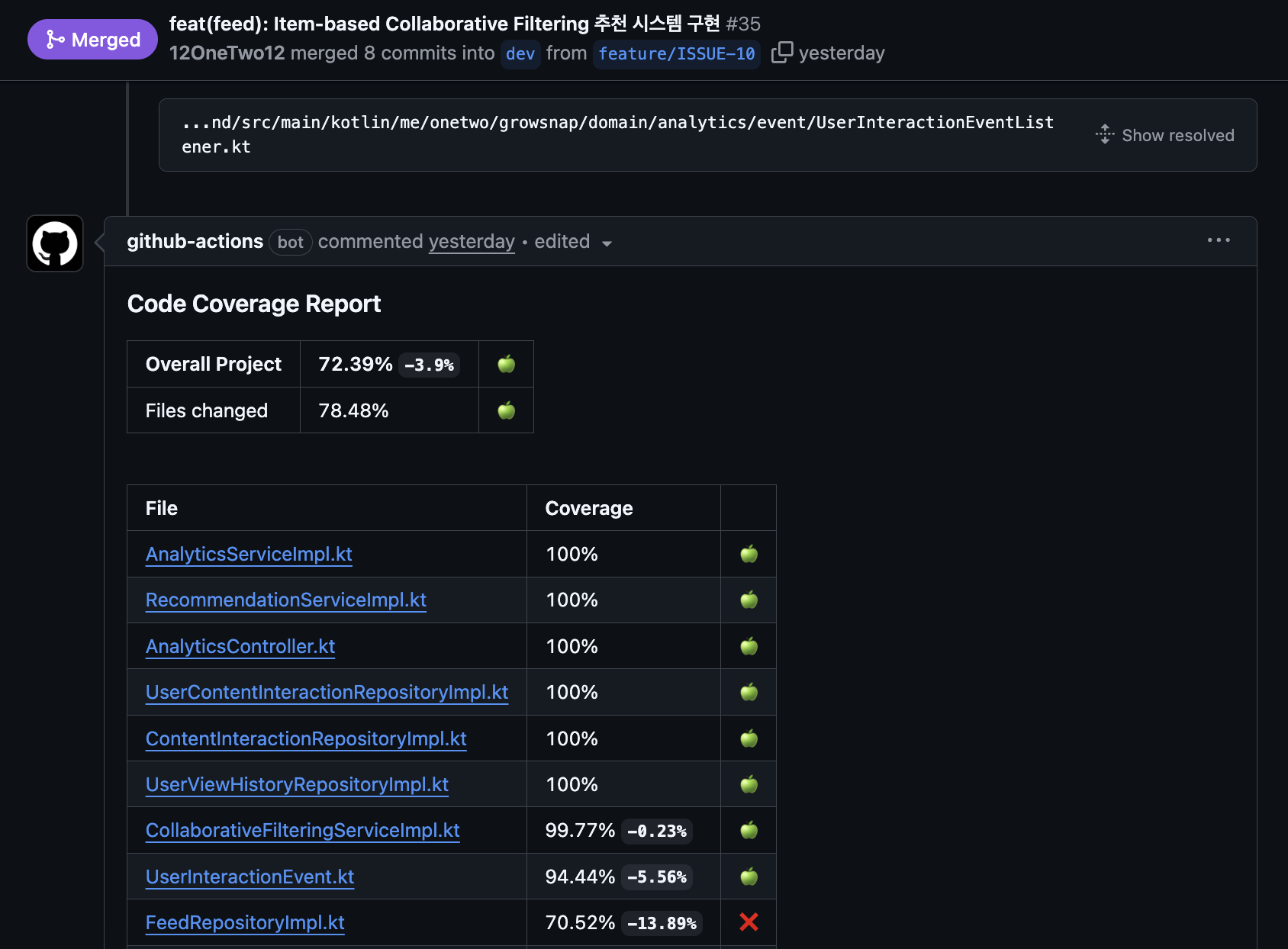
Jacoco - Test coverage
- Whether code written by AI has sufficient tests
- Whether coverage is above standard
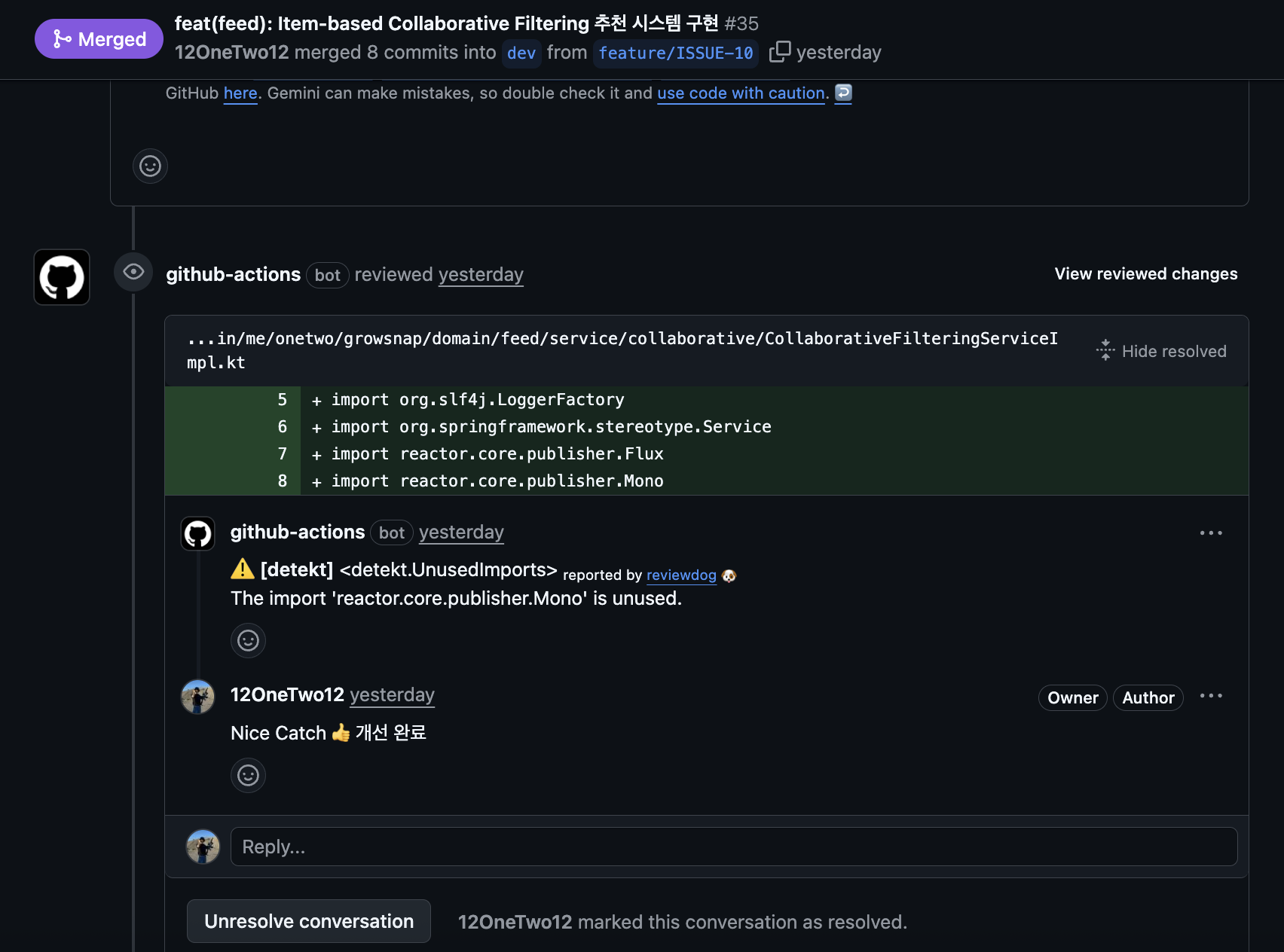
Detekt, reviewDog - Static code analysis
- Whether follows Kotlin code style
- Whether there are potential bugs
ArchUnit - Architecture rule verification
- Whether Controller depends only on Service
- Whether Service depends only on Repository
- Whether there are circular references
- Whether follows Soft Delete rules
These tools run automatically in CI/CD, and results remain as decorations on PR.
For example, if Jacoco test coverage is insufficient, red X appears on PR, and if sufficient, green check appears. So anyone can check immediately when PR is opened, without me having to verify one by one locally.
And I added one more thing.
Set Gemini Assistant as PR code reviewer.
So Gemini reviews code written by Claude Code on PR. You might think “AI reviews AI code?” but actually the effect was quite significant.
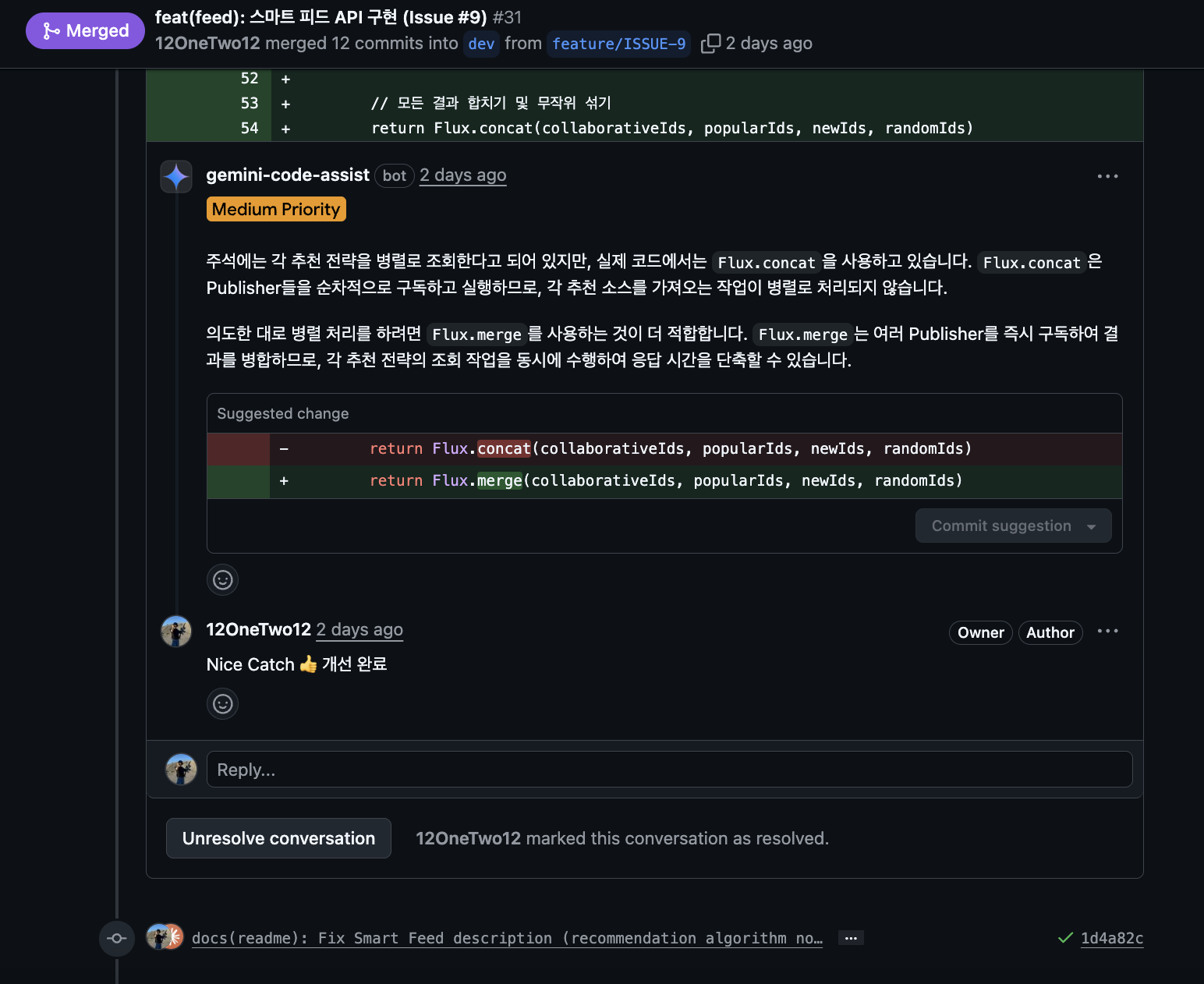
- “This function seems to need null check”
- “This query might have performance issues because there’s no index”
- “Test cases are insufficient”
When I deliver such feedback to Claude Code again, it writes improved code, Commits, then Pushes.
Is this actually effective?
Surprisingly, AgentCoder research (2024) verified this. In a way where Test executor agent verifies code written by Programmer agent and gives feedback.
Results were quite surprising.
- HumanEval benchmark: 74.4% (1 time) → 79.9% (5 repetitions)
- MBPP-ET benchmark: 80.3% → 89.1%
Performance went up as AIs reviewed each other repeatedly.
And more interesting, collaboration of multiple AIs was much more effective than single AI collaboration. Cross-verification where different AI reviews code generated by AI and reflects that feedback again actually further improved performance.
- Multi-agent approach: 87.8%-89.9%
- Single agent: 61.0%-61.6%
So I introduced Gemini Assistant code review in PR units, and doing this greatly reduced my verification burden.
- Claude Code writes code
- Automation tools (ArchUnit, Jacoco, Detekt) verify
- Gemini code reviews
- I can judge by looking at PR decorations and review comments
If you look at PR where I actually collaborate with two AIs, understanding of work process will be easier.
Doing this, I could entrust even more complex tasks to AI.
What I Realized Using It Directly
Looking back, at first I used AI only in limited ways due to vague anxiety.
- “Because I felt I shouldn’t trust AI too much”
- “Worried I’d become an idiot who just leaves everything to AI and knows nothing”
But using it directly while collaborating with AI in side project, I got a paradoxical realization.
To entrust more work to AI, I need to know better.
Like the interrupt experiences mentioned above, the reason I could naturally interrupt in the middle of AI writing code was because I knew.
If I didn’t know, I might have just used code AI wrote as is. Later bugs might have appeared, or might have been pointed out in code review.
So what I strongly felt is that a very important developer ability in collaboration with AI is “knowing well enough to interrupt AI’s work in real-time”.
TDD Was More Important Than Expected
While proceeding with project, I also directly experienced what Toby emphasized: “You can’t not do TDD”.
Having test code written first then leaving implementation to AI, I could objectively verify AI’s work.
AI writes tests according to requirements → AI writes code → Run tests → Check pass/fail → Analyze and rewrite if failedTests were a kind of safety net and verification means. They became a means to check if AI reached Goal, and seemed to be the most clear means of conveying to AI “exactly what is wanted”.
Even when refactoring or adding features, since there are tests I could immediately check if existing functions have problems.
Therefore after introducing TDD, I could entrust even more complex tasks to AI.
Requesting to write tests scenario-based, just from test code I could judge “what function they’re trying to make”, “seems like exception handling is insufficient somewhere”.
Changing Collaboration Model According to Work Characteristics
Also, I actually applied the three collaboration models between AI and humans.
AITL (AI-in-the-Loop): For architecture design or core business logic, I set the direction and had AI write code.
HITL (Human-in-the-Loop): For API endpoint implementation or test code writing, AI led but I verified through code review. As much as possible, I tried to practice “no click-click!” in all moments of collaborating with AI. I didn’t accept unconditionally but asked questions.
- “Why did you write it this way?”
- “Aren’t there other methods?”
- “What are pros and cons of this code?”
Among things Toby emphasized while shouting “absolutely no click-click”, there’s a memorable saying:
“Think of AI as senior developer. Think of it as junior developer who only inputs code while ignoring all explanations when senior developer helps making code with detailed explanations next to them, then you can know its importance”
Actually in almost all processes of collaboration, I always went through the process of checking Claude Code’s execution plan, questioning, refuting, replanning, executing. While doing this I could naturally adjust and understand work direction. Questions were also learning opportunities and became verification of execution plans.
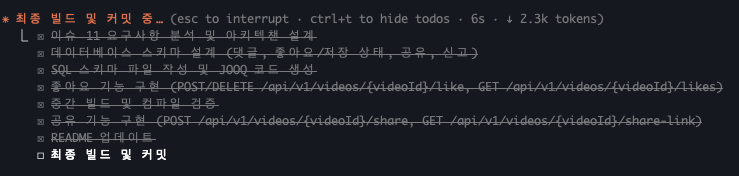
Looking at Claude Code’s execution plans, you can see thinking and development processes are quite similar to us developers. In that process, I proposed other alternatives like talking with other human developers, and also accepted Claude code’s refutations.
HOTL (Human-on-the-Loop): For simple tasks like batch parameter changes, Claude Rule, Skill modifications, there were occasional cases where AI performed autonomously and I just checked results. (ex.PR-Separating CLAUDE.md into Skills)
As mentioned above, since automation tools verify on PR, there were tasks where checking at final confirmation was sufficient with my intervention. I felt that switching modes according to work characteristics is key.
After All
Must become developer who can refute AI.
This was the conclusion I reached.
- To judge whether code written by AI is right or wrong, I must know that technology.
- When AI is going in wrong direction, I must be able to refute.
- I think I must continuously grow while studying through AI.
Not being able to judge right or wrong but trusting and leaving it felt like a shortcut to me being left behind.
If used well it helps tremendously with productivity and learning, but if you become a developer who just “AI, just do it” without thinking, I felt nothing like experience or knowledge will remain for me. This would absolutely lead to bad results. In this sense it felt like a “double-edged sword”.
So I’ll continue studying and working hard to be able to refute in the future. By actively utilizing AI for capability enhancement and learning too.
In that process, I think I can grow as Augmented Developer.
From Now On
There still seem to be many insufficient points in collaboration with AI too. I think there are many people who utilize it much better with better methods than me. So I should work harder as I’m late.
“The future is already here. It’s just not evenly distributed yet”
I think I now know the meaning of this sentence.
The future seems to already be beside us. AI coding tools, automation tools… They were all in my hands.
However, ability to properly embrace and utilize it doesn’t seem to be evenly given.
At first I used AI only in limited ways due to vague anxiety, but bumping into it directly made me feel it clearly.
To entrust more work to AI, I need to know better.
Of course there are still so many insufficient points, so I’ll continue studying to verify code written by AI in the future. I’ll question and refute AI’s suggestions without unconditionally accepting them. I’ll immediately improve when I find inefficiency.
I’ll try to utilize AI as learning partner and collaboration tool not just simple assistant.
Are you properly utilizing the future in your hands too?
I think I’ve barely started now.