Review of Auto-Trading System Built with Spring Batch
It’s not grand content, but I want to share a personal experience I had a few months ago.
https://github.com/12OneTwo12/auto-trading
This article doesn’t describe how to implement it. If you want to see the code, please enter the github link above. Also, I think the auto-trading system I made doesn’t match the purpose designed for the convenience of Spring batch’s large-volume batch processing. It’s strongly for learning purposes, so if you want to make an auto-trading system personally, I recommend finding other methods.
How nice would it be if everyone could achieve the financial freedom they dream of? I always think that way too. I always had the thought that I want to quickly achieve financial freedom and eat whatever I want and live doing whatever I want.
In daily life thinking how nice it would be if money came in even while sleeping, an interesting thought occurred to me.
It was May, about 2 months after I started working.
There was a Batch server running at the company, and it was one of the servers the development team I belonged to was in charge of. As usual, while feeling down looking at my bank account balance
How about making a coin auto-trading program with Batch server…!!!
Money copies while sleeping…?!
I came to have such thoughts.
With thoughts full of dreams and hopes, the project started.
Of course, it can be implemented not with Batch but with simple scheduler. There are also well-made libraries on the Python side. Libraries provided by coin companies are also well-made.
But I decided to implement with Spring batch for two reasons:
- Expandability potential ( ex. When this system runs well later, it would be nice to dynamically schedule and also dynamically select coin models )
- Spring batch learning purpose ( I want to directly make and better understand how the Spring batch server the team is in charge of works )
So actually there wasn’t a grand reason.
So far was why I chose Spring batch, and I chose binance as the exchange. The biggest reason I chose Binance was that I didn’t have to worry about it collapsing because it’s the largest coin exchange. ( ex. FTX )
Implementation wasn’t very difficult. It’s recommended to study Spring Batch separately for how to configure Batch, Job, Step, those parts.
The most important logic that can be seen in that logic is as follows:
| |
For information in account, whether to buy, profitability, we check by requesting information through APIs provided by binance. ( Binance API Documentation )
Actually reading this API documentation was one of the hardest things.. haha ;;
Until this time I was still full of dreams and hopes. Maybe I’ll become rich soon…? hehe Right after completion, I rolled it into docker image and ran it on EC2. Because if it runs 24 hours, money will be copied for 24 hours!
I even implemented CD simply with Github action.
| |
Then how were the results?? Let’s find out right away!
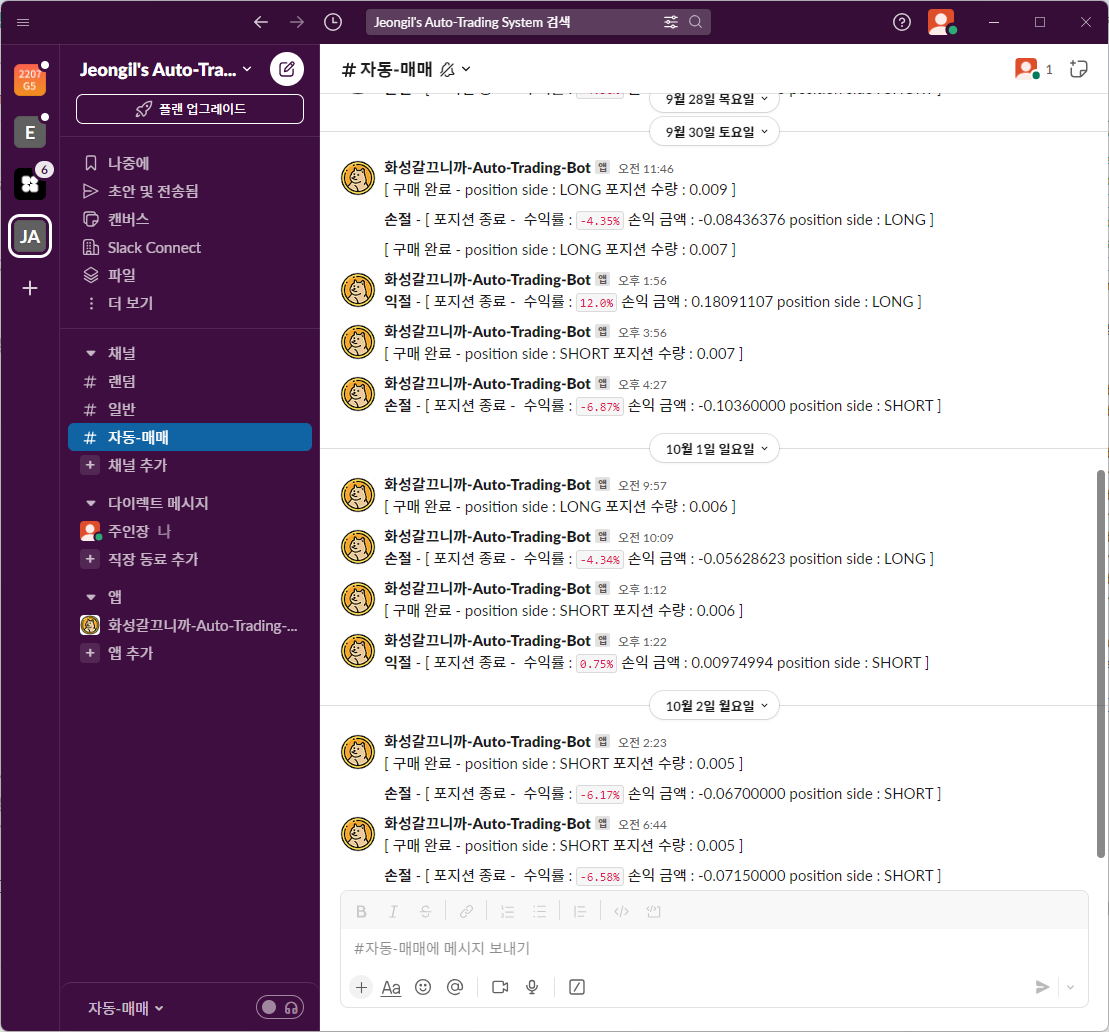
Money was being deleted, not copied while sleeping…!
Let's stop finding out...
Result was liquidation ending...
Of course for profits, what’s most important is by what criteria to hold Position,
criteria for Long and Shot, there are various parts,
but my so-called Burns-Your-Skin-Auto-Trading-Bot swallowed my precious 200,000 won and
gave me two lessons:
- Don’t trade coins without knowing anything..
- But you got a sense since you implemented batch directly to the end, right?
It gave such lessons..
The Burns-Your-Skin-Auto-Trading-Bot that has now stopped operating will restart operation whenever I
think of brilliant purchase and sale, trading criteria.
Of course looking at code I wrote now after about 5 months have passed in October, everywhere looks like bad code I want to tear apart and fix, and there are problems that this auto-trading system doesn’t match Batch’s purpose suitable for large-volume record processing.
But I think by that time, future me will worry again, fix, and change things. Future me, do well.