From On-Premises to Cloud - A Zero-Downtime Migration Story
Hello,
I’m Jeong Jeong-il, a 3rd-year backend developer working at a PropTech platform.
In this post, I’d like to share my experience migrating a monolithic server operating in an on-premises environment to the cloud (AWS), and the infrastructure automation experience using Terraform during this process.
Background
When I joined the team in March this year, most services were already running in a cloud environment. However, one of the services was still operating in an IDC with a monolithic architecture. This server had a very simple structure with the web application and database configured on the same physical server.
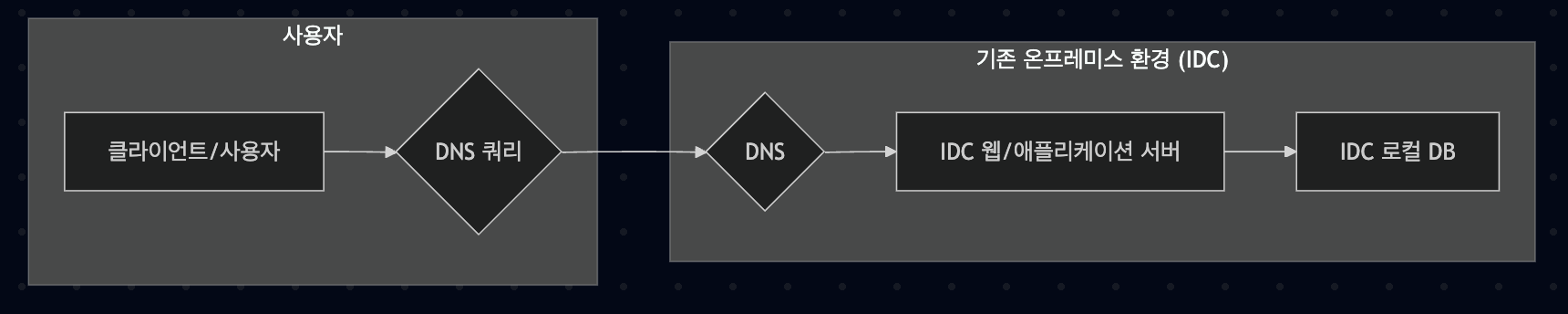
This server experienced intermittent server downtime due to hardware contact failures, and there were constraints on scaling in response to traffic increases.
These problems led to degraded service stability and increased operational burden. In particular, unexpected server downtime due to hardware contact failures was a very serious problem for user experience.
Decision to Migrate to Cloud
After reviewing various alternatives, we determined that cloud migration was the optimal solution.
Most servers were already running in the cloud, and for the following reasons, we judged that migration to the cloud was essential:
- Improved Stability: Utilize AWS’s high availability infrastructure
- Flexible Scaling: Easy resource adjustment according to traffic changes
- Unified Operating Environment: Apply the same management system as existing cloud servers
- Cost Efficiency: Optimize resources with a pay-as-you-go model
Also, the biggest reason was that the company had cloud-related credits, so the cost aspect was significant.
Migration Challenge: Zero-Downtime Transition
The most important requirement when establishing the migration plan was minimizing service downtime. To transition safely without harming user experience, we had to solve the following challenges:
- Traffic Handling During DNS Propagation: After DNS change, some users access the IDC server while others access the cloud server until propagation is complete
- Maintaining Data Consistency: Ensure consistency of data changes occurring in both environments during the transition period
- Rollback Plan: Prepare a plan to quickly return to the original environment in case of problems
Zero-Downtime Migration Strategy
Since it was an operating web server, it had to continue operating with the same DNS. Therefore, even if we configured the server, there was a time for the DNS endpoint to propagate.
Considering the DNS propagation time, we established the following strategy:
- Build Cloud Environment: Pre-configure the same server environment on AWS
- Dual Operation: Operate servers on both IDC and cloud during the propagation period after DNS change
- DNS Transition: Change DNS to cloud server IP when ready
- Monitoring: Real-time monitoring of the transition process and immediate response in case of problems
- IDC Server Shutdown: Shut down IDC server after confirming DNS propagation completion
In this way, we prevented downtime by allowing users to naturally transition to the new environment according to their DNS cache status.
Data Consistency Problem and CDC Solution
The biggest technical challenge during the migration process was maintaining data consistency.
Since we decided to migrate to a managed database in the cloud, we couldn’t continue using the existing IDC local DB.
Therefore, serious problems could occur if the databases of the IDC server and cloud server were not synchronized while both environments were operating simultaneously.
We reviewed several alternatives to solve this problem:
- Database Replication: Use DB’s own replication function
- Application-Level Dual Write: Write to both DBs simultaneously from the application
- Message Queue-Based Synchronization: Publish data changes to message queue for synchronization
- ETL-Based Batch Synchronization: Synchronize data through periodic batch jobs
- CDC (Change Data Capture): Real-time synchronization by capturing DB change logs
After review, we determined that CDC technology was most suitable in terms of real-time capability and reliability. Therefore, we implemented it as follows:
CDC Configuration: Detect changes in IDC DB in real-time and replicate to AWS RDS
Unidirectional Synchronization: Synchronize only in the direction IDC DB → AWS RDS during the transition period

Application Configuration: Configure all servers to reference IDC DB during the transition period
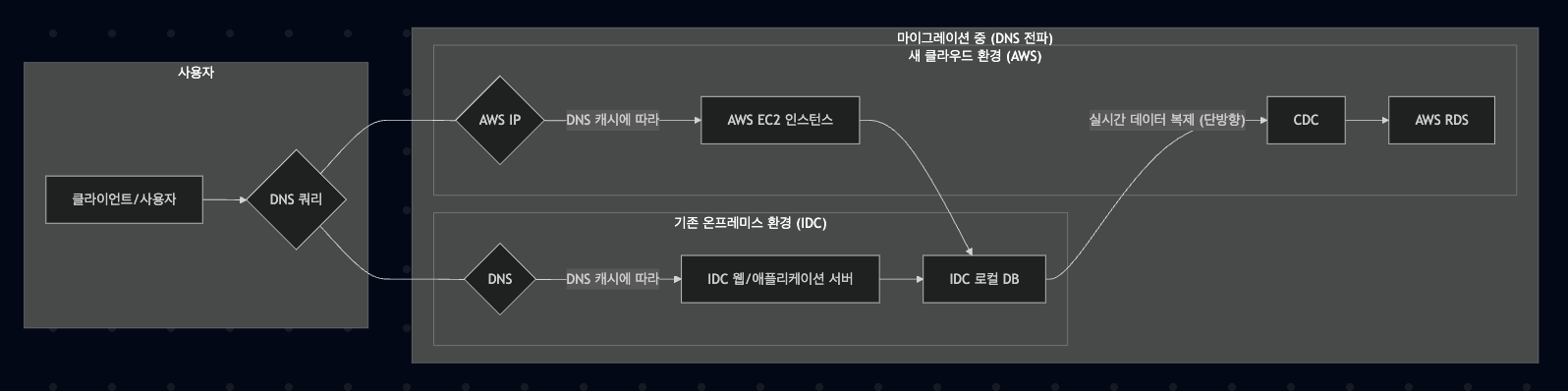
After Transition Completion: Change all servers’ DB reference to RDS after confirming DNS propagation completion
Afterward: Shut down existing IDC server and CDC configuration
Through this approach, we solved data inconsistency problems that could occur during the DNS propagation period.
We chose AWS DMS as our CDC solution. The reason was that since it was a migration to an AWS environment, we judged it had the best compatibility with RDS.
Infrastructure Automation (IaC)
During the cloud environment construction process, we introduced Terraform for Infrastructure as Code (IaC). We managed the following major resources as code:
| |
Benefits gained from using Terraform:
- Infrastructure as Code: Easy version control and change tracking by managing all infrastructure configurations as code
- Reproducibility: Ability to recreate the same environment at any time when needed
- Documentation: The code itself serves as documentation of infrastructure configuration
- Automation: Minimize manual work and reduce human errors
Migration Execution Process
The actual migration proceeded in the following steps:
Preparation
- Write and test Terraform code
- Configure and test CDC synchronization
- Verify rollback scenarios
Build Cloud Environment
- Provision AWS infrastructure through Terraform
- Deploy and configure applications
- Perform functional tests
Start Data Synchronization
- Activate CDC
- Confirm initial data synchronization completion
- Monitor real-time replication status
Execute Transition
- Select low-traffic time period (early morning)
- Change DNS records
- Monitor both environments
- Track traffic transition situation in real-time
Complete Transition
- Confirm DNS propagation completion
- Change application DB reference to RDS
- Stop CDC
- Shut down IDC server
Results
As a result of the migration, we achieved the following outcomes:
- Zero-Downtime Transition Achieved: Successfully completed migration without degrading user experience
- Improved Stability: Resolved server downtime issues due to hardware contact failures
- Secured Scalability: Flexible scaling possible according to needs in cloud environment
- Improved Operational Efficiency: Increased management efficiency as all servers are integrated into cloud environment
Through this migration, I really felt the importance of thorough planning. By collaborating with team members to configure the plan, we were able to minimize the possibility of problems occurring.
Also, as I configured infrastructure automation through Terraform, it was so easy to manage that it made me feel like a fool for having configured everything manually one by one until now. I once again realized that a stepwise approach is effective in reducing risk rather than transitioning everything at once.
Conclusion
The migration from IDC to cloud was another challenge, but we were able to complete it successfully through careful preparation and appropriate technology selection. In particular, the data synchronization strategy using CDC and infrastructure automation through Terraform are memorable.
I hope my experience can be of some help to those experiencing similar problems. Thank you.