APIs Slowing Down After Deployment: Improving JVM Cold Start Problem by 85%
Introduction
Recently, our team migrated from a Docker Compose-based production environment to Kubernetes. It was a choice to properly utilize features needed in an MSA environment, such as scalability, automation, and zero-downtime deployment.
Related article: From No Dev Server to GitOps: My Journey of Introducing Kubernetes from Scratch
While examining metrics after the migration, I discovered a peculiar pattern.
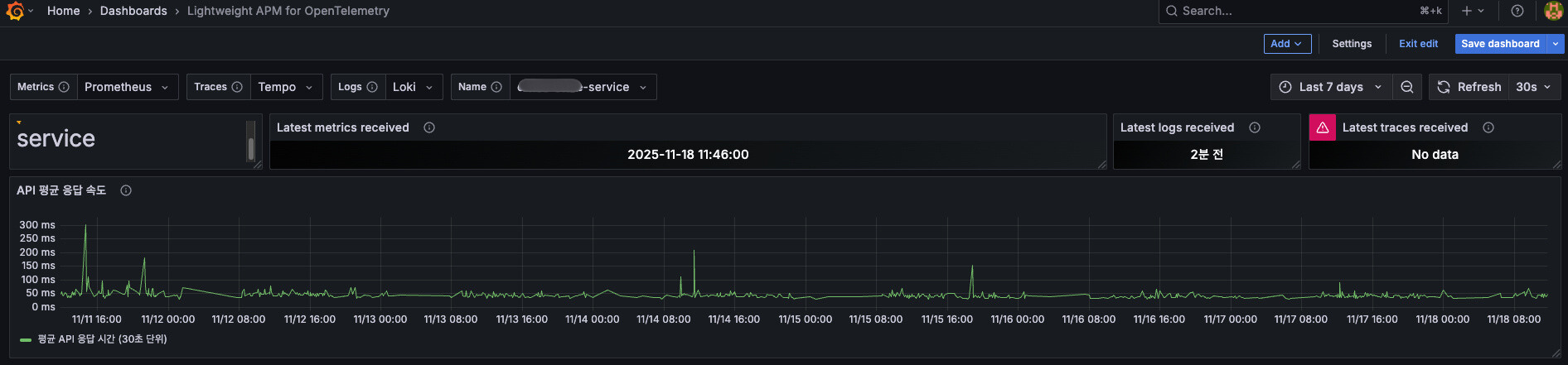
For a few minutes after deployment, the first API requests were unusually slow. Responses that normally took 100~200ms were taking 1.2-1.4 seconds right after deployment.
“It slows down whenever we deploy?”
At first, I thought it was a deployment process issue, but seeing it naturally speed up over time, I became certain. It was a JVM Cold Start problem.
This post records and shares the process of applying Kubernetes’s startupProbe and JVM Warm-up to our service.
Problem: First Request After Deployment Is Too Slow
Symptoms
Our company’s service is composed of MSA, with each service written in Spring Boot + Kotlin. Deployments are done on Kubernetes, and the following phenomenon repeated after deployment:
- First API request: 1.19~1.39s (1,190~1,390ms)
- From second request onwards: 100~200ms
About a 7-14x difference.

First request test response time after deployment - 1,000ms~1,300ms
Root Cause Analysis
It was due to the characteristics of the JIT (Just In Time) compiler, which can be called the fate of JVM-based applications.
The JVM operates in interpreter mode when first executing code. It’s a structure that only optimizes to native code after finding frequently used code (Hot Spot). In other words, the first request becomes a sacrifice.
| Stage | Execution Method | Speed |
|---|---|---|
| Cold Start (first execution) | Interpreter mode | Slow |
| Warm-up complete | JIT optimization complete | Fast |
Kubernetes environment characteristics are added here:
- Pods restart anytime (deployment, scaling, failures)
- New JVMs start in Cold Start state every time
- The first user request becomes the Warm-up sacrifice
I thought, “I can’t just leave this alone.”
Why Wasn’t This a Problem Before?
Actually, this problem wasn’t new. Cold Start existed when operating with Docker Compose too. However, since containers lived long once they were up, it was only briefly a problem during deployments.
Kubernetes is different.
Kubernetes treats Pods as “Cattle, not Pets”. They’re seen as entities that can be killed anytime and can die.
- Rolling Update: New Pods are continuously created during deployment
- Auto Scaling: Pods increase and decrease according to load
- Node restart: Pods are relocated due to infrastructure issues
In other words, the frequency of Pod recreation increased significantly, and proportionally the probability of users sending requests to Pods in Cold Start state also increased.
Finding a Solution
“This can’t be a problem only we’re experiencing…”
I started searching. As expected, many companies had already experienced and solved similar problems.
- OLX shared methods of dynamically adjusting CPU resources
- BlaBlaCar used the startupProbe + Warm-up endpoint pattern
- I could find actual application cases in domestic tech blogs too
“This is a standard pattern. Let’s apply it to us too.”
Solution Process: startupProbe + JVM Warm-up
Strategy
The core idea consists of two parts:
- Execute Warm-up: “Let’s wake up the JVM by making requests ourselves before users make requests”
- Wait for Warm-up: “Let’s configure
startupProbeso Kubernetes waits for warm-up completion”
startupProbe doesn’t execute warm-up, but rather confirms and waits for warm-up completion.
Step 1: Understanding Kubernetes Probes
Kubernetes has 3 types of Probes:
| Probe | Purpose | Action on Failure |
|---|---|---|
| livenessProbe | Check if container is alive | Restart Pod |
| readinessProbe | Check if ready to receive traffic | Exclude from Service |
| startupProbe | Check if application has started | Disable other Probes until successful |
What we need is startupProbe.
Why is startupProbe necessary?
- If warm-up takes long (e.g., 1-2 minutes), livenessProbe might fail first and restart the Pod
readinessProbeandlivenessProbeare disabled until startupProbe succeeds- Therefore, we can safely secure warm-up time
Step 2: Implementing Warm-up
I implemented as follows by referencing various references.
(1) Creating WarmupHealthIndicator
Create a Health Indicator that integrates with Spring Actuator:
| |
(2) Implementing Warmup Logic
Use ContextRefreshedEvent to automatically execute when the application starts:
| |
(3) application.yml Configuration
| |
Key Points:
ContextRefreshedEvent: Executes before HTTP port opens to prevent request influx during warm-upAtomicBoolean: Prevents duplicate execution through concurrency controlHealthIndicator: Naturally integrates with Kubernetes probe- Only include in readiness: Block traffic until warm-up completion
Step 3: Kubernetes Probe Configuration
Important: startupProbe is required!
Since livenessProbe can restart the Pod if warm-up takes long, you must wait for warm-up completion with startupProbe.
| |
Configuration Intent:
- startupProbe: Waits for warm-up completion, disabling other probes until completion
/actuator/health/readiness: Includes warmup HealthIndicator, returns DOWN until warm-up completionfailureThreshold: 24: Guarantees maximum 2 minutes for warm-up time- Exclude warmup from liveness: Prevents Pod restart even if warm-up takes long
- CPU
limits: 1800m: Provides sufficient CPU during Warm-up
Complete Operation Flow
Let’s look at the complete flow of how these configurations cooperate:
1. Pod starts
   ↓
2. Spring Boot application starts
   ↓
3. ContextRefreshedEvent occurs
   → WarmupRunner starts warm-up execution
   → WarmupHealthIndicator maintains DOWN state
   ↓
4. Warm-up in progress...
   → Repeatedly call main APIs 10 times each
   → JIT compiler optimizes code
   → startupProbe checks /actuator/health/readiness every 5 seconds
   → Continues waiting since DOWN (maximum 24 times)
   ↓
5. Warm-up complete
   → WarmupHealthIndicator.complete() called
   → WarmupHealthIndicator changes to UP
   ↓
6. startupProbe succeeds
   → /actuator/health/readiness returns UP
   → startupProbe succeeds
   ↓
7. readinessProbe, livenessProbe activate
   → readinessProbe registers Pod to Service
   ↓
8. Start receiving traffic
   → Processes requests in already warm-up completed state
Key Points:
- Warm-up execution: Handled by
ContextRefreshedEventlistener - Warm-up wait: Handled by
startupProbe - startupProbe doesn’t execute warm-up, it just waits for warm-up completion
Step 4: CPU Resource Optimization
Here was an important discovery. Initially, I set the CPU limit to 1000m, but Warm-up didn’t work properly.
It turned out that during JVM Warm-up, about 3 times more CPU than usual was needed. The JIT compiler uses a lot of CPU while optimizing code.
| |
Due to Kubernetes’s CGroup CPU Throttling, if the limit is hit, Warm-up slows down. So I guaranteed sufficient CPU during Warm-up and only reserved minimum resources with requests during normal times.
Results: 85% Improvement
First request response time after applying Warm-up - average 150~230ms
Before (Cold Start)
- First API request: 1,190~1,390ms
- Second request: 100~200ms
- User-perceived inconvenience: High
After (Warm-up applied)
- First API request: 150~230ms
- Second request: 100~200ms
- User-perceived inconvenience: None
About 85% improvement, and most importantly, the difference between first and subsequent requests was significantly reduced.
Positive Effects
- Auto Scaling Stabilization: Scaling became smoother since new Pods can immediately handle traffic
- Reduced User Churn: Users who were churning due to slow first page loading during deployment times decreased
Precautions During Application
Looking at application cases from other companies, you should be careful about the following points.
1. Increased Deployment Time
Problem: Time for Pods to reach Ready state may increase due to Warm-up.
Solution: Adjust Rolling Update strategy.
| |
This makes deployment a bit slower, but guarantees zero-downtime deployment.
2. External API Warm-up
Problem: Including external APIs in Warm-up propagates unnecessary load to external systems.
Solution: It’s best to limit Warm-up to internal APIs or dummy data processing logic only.
| |
3. DB Connection Issues
Problem: Calling APIs that query DB during Warm-up can exhaust the connection pool.
Solution:
- Mock APIs that need DB queries or
- Adjust connection pool size
| |
Lessons Learned
1. Understanding JVM Characteristics Is Important
Just because you use Java/Kotlin doesn’t mean you can skip knowing the JVM - you can’t solve these performance problems without understanding it. I felt again that it’s important to understand JVM internal operation principles such as JIT compiler, GC, and class loading.
2. Kubernetes Probes Are Not Just Health Checks
It’s important to strategically utilize Kubernetes’s 3 Probes according to situations.
| Situation | Appropriate Probe |
|---|---|
| Slow start (JVM Warm-up) | startupProbe |
| Check traffic reception readiness | readinessProbe |
| Check if process is alive | livenessProbe |
3. Resources Generously, But Don’t Waste
It’s important to understand and utilize the difference between CPU requests and limits.
requests: Minimum resources needed normally (scheduling basis)limits: Maximum usable resources (Throttling basis)
When resources are temporarily needed in large amounts like Warm-up, it’s efficient to set limits generously while matching requests to normal usage.
4. Monitoring Is the Start of Everything
Both discovering this problem and confirming improvements were thanks to metrics. If we hadn’t monitored API response times with Prometheus + Grafana, we probably would have passed over this problem unknowingly.
Reference: Applying Warm-up in Spring Boot + Kubernetes - LINE Engineering Improving JVM Warm-up on Kubernetes - OLX Engineering Kubernetes Official Documentation - Liveness, Readiness, Startup Probes
Closing
The JVM Cold Start problem is an unavoidable homework in Kubernetes environments. However, by appropriately utilizing startupProbe and JVM Warm-up, you can enjoy the advantages of container orchestration without harming user experience.
I hope this post helps those experiencing similar problems.